Content
Content
Wells Fargo - App Modernization
Wells Fargo, founded in 1852, is one of the largest U.S. banks, offering banking, insurance, investment, and mortgage services to 70M+ customers across 35+ countries. In 2019, the bank aimed to modernize it's mobile app experience. I was part of the navigation and account management team, working on the path towards the progressive modernization of the user experience today.
Company
Wells Fargo
Timeline
2019
—
2020
Role
Senior product designer
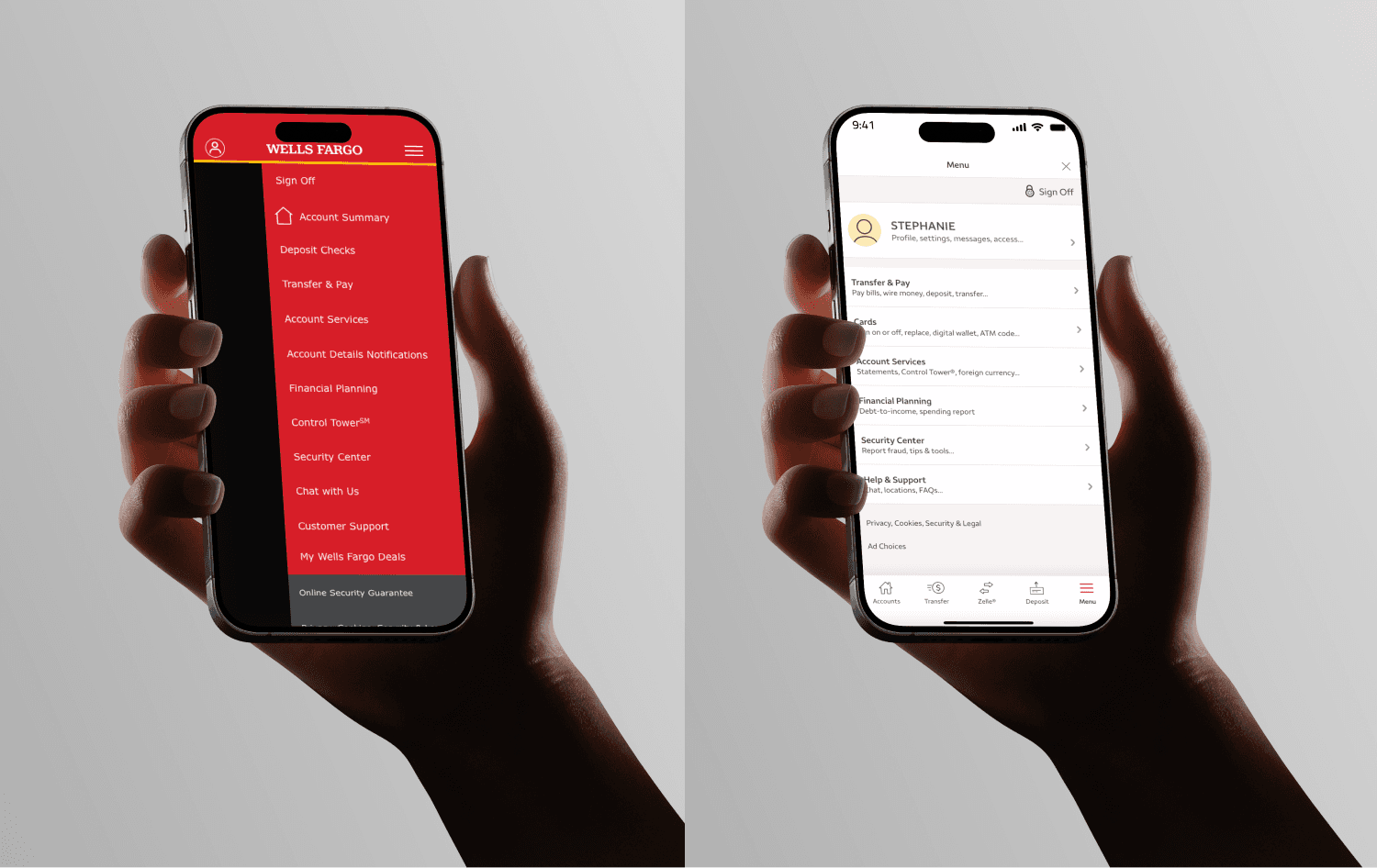
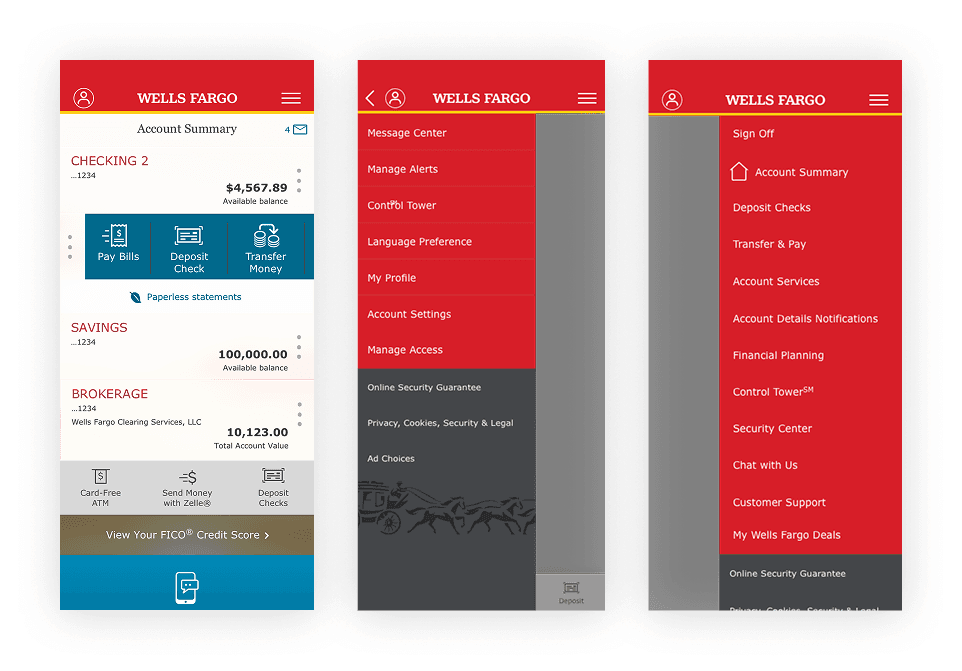
Project overview
“There are two sliding navigation menus and they are painfully
slow. Beyond the speed concerns, there are far too many options
listed which just makes the app confusing to use...
Overall the experience really makes me lose confidence
in the company to handle my money properly.”
Challenges
Key tasks (checking credit score, overdraft settings, etc.) were buried under generic labels like “More” and “Services”
Users struggled with navigation, increasing frustration and support call volume
The legacy IA didn’t reflect current user behavior or device habits
Accessibility and consistency issues were piling up
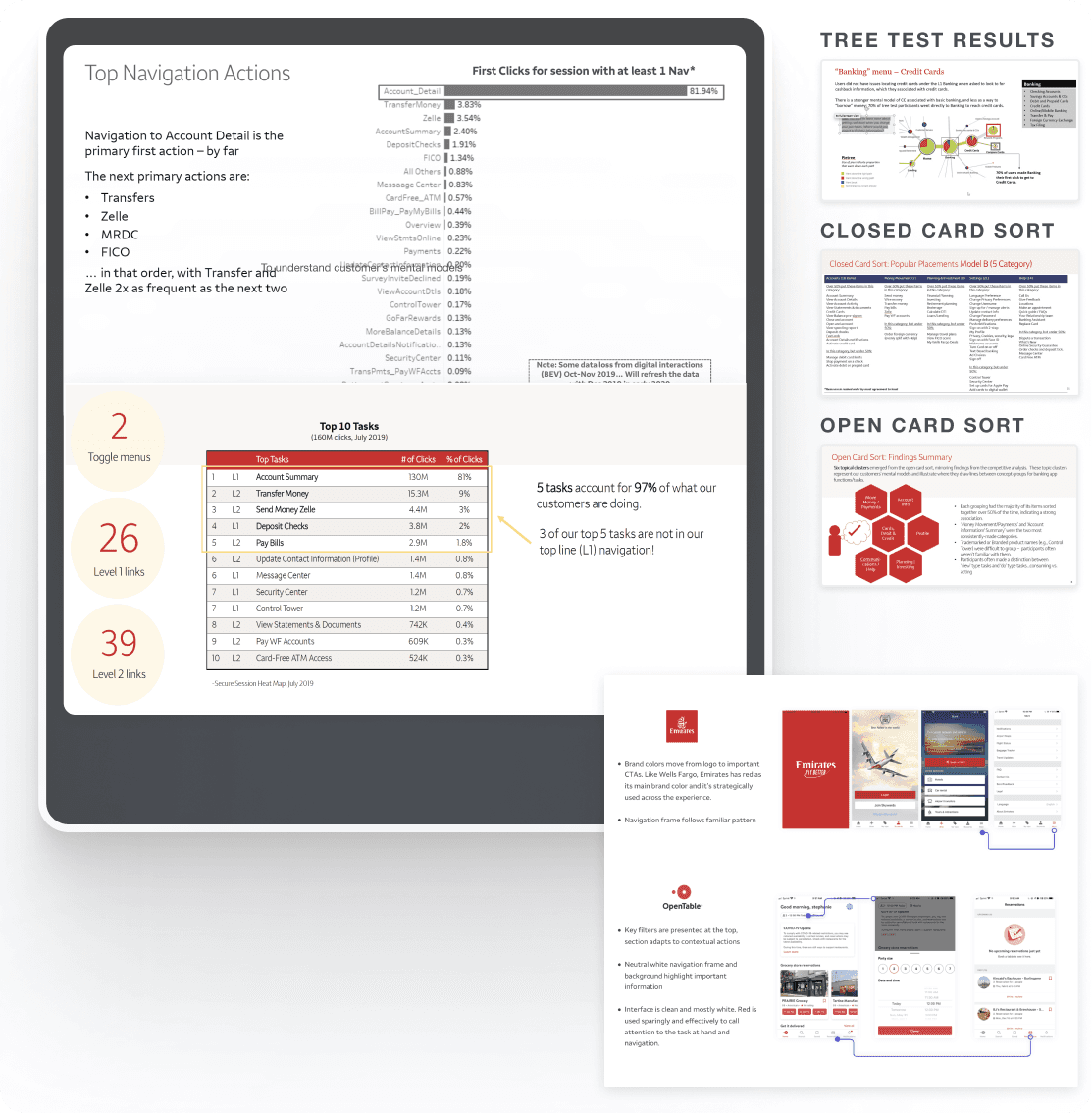
By analyzing quantitative data, the top tasks were clear: Users wanted to view account summary and details but then struggled to perform tasks following up viewing their accounts such as making payments or depositing checks.
I also performed a thorough competitive analysis, to not only validate that the use of a bottom navigation bar, but also to map out how the more menu structure was organized. What needed to be front and center, versus the information architecture of the less frequently used but equally important tasks in case of emergencies such as a lost credit card, or overdraft fees.
Testing the information architecture
As I learned more and collaborated with our UX Researcher, I wondered... “ How can we better organize the information for our customers, but at the same time navigate dependencies and constraints that come in a highly regulated environment like Wells Fargo?”
My team and I worked on a closed card sorting test with a new information architecture with five main groups and concepts in which, users placed words under a category.
Accounts → Open/close account, account summary account details
Move Money → Pay /Transfer/Deposit
Planning & Investment → Retirement & Financial Planning, Brokerage
Settings → Change privacy preferences, change password, my profile
Help → Call us, Baking Assistant, Replace card
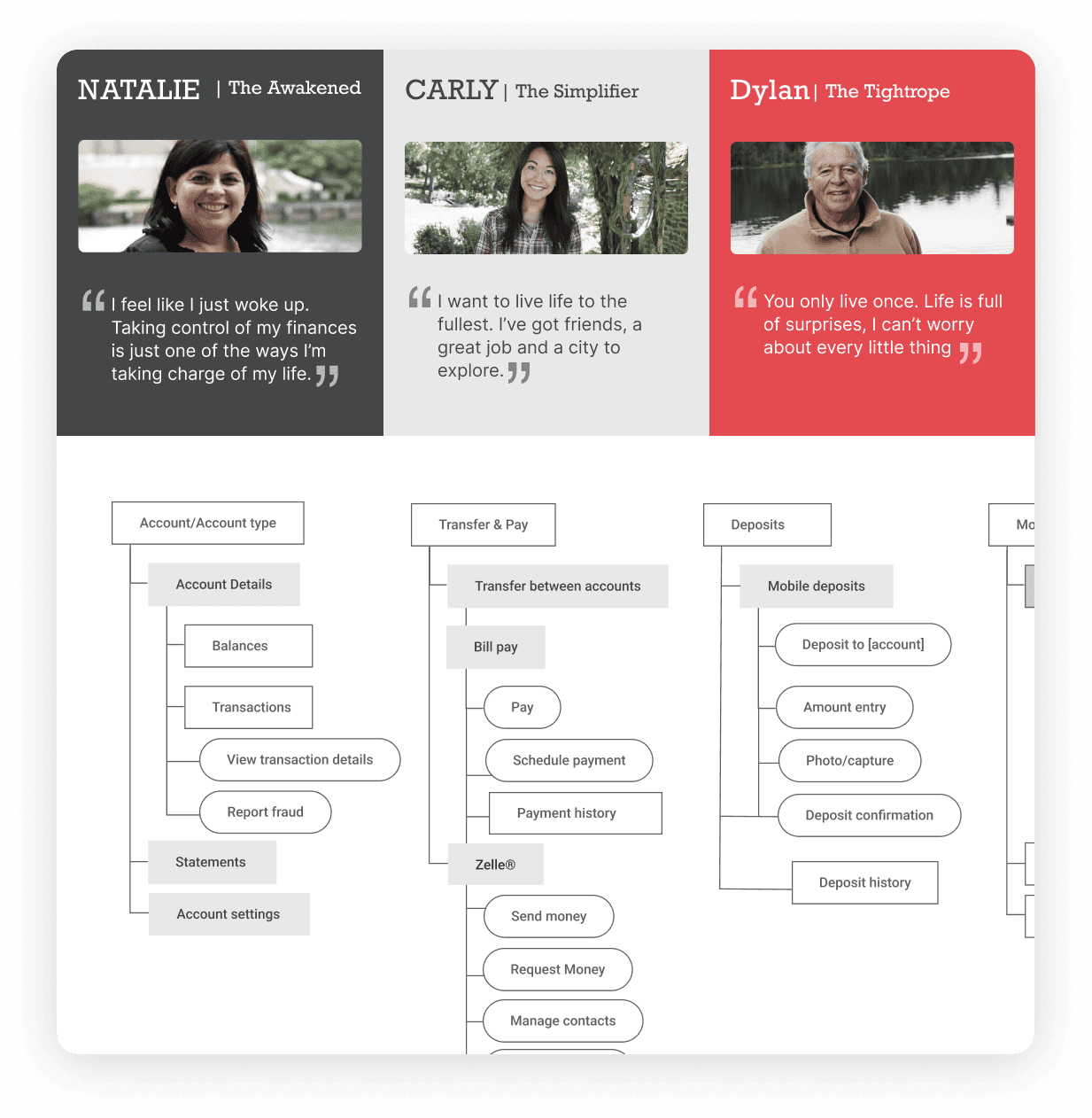
Carly: Our consumer banking persona
I looked at our persona Carly and put myself in her shoes, walking through her journey to better understand the sequence of events from her perspective.
What happens after she views her account balances?
Design iterations
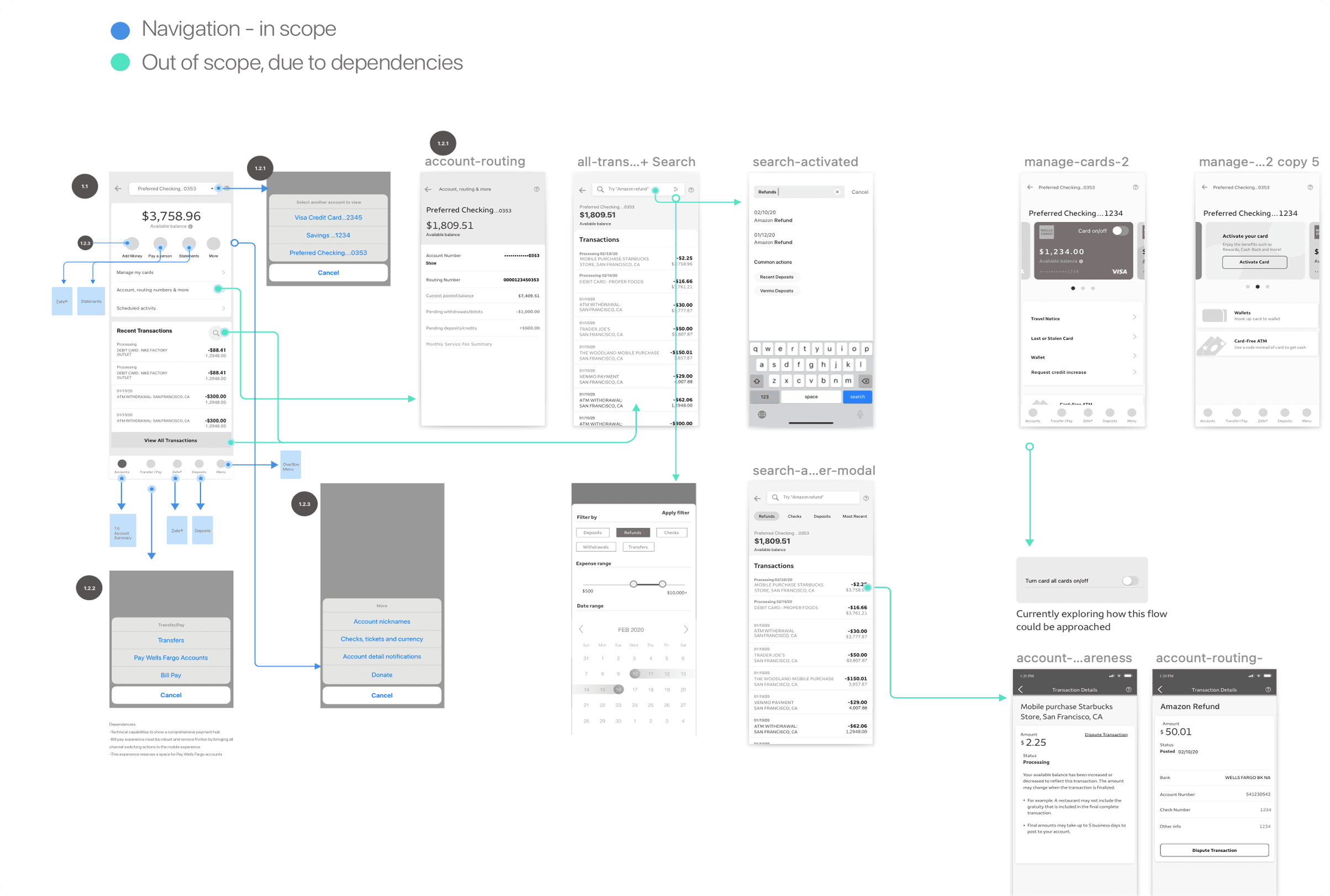
Then, I worked on several iterations of the navigation structure. We could take a nested doll approach or a hub and spoke navigational model.
In my process, I wanted to first understand users’ behavior. With my team, we analyzed the paths users were navigating to. In the business side, JD Power reports showed Wells Fargo lagging against competitors. After the competitive audit and research data, I used these learnings to support my design explorations and rationales.
I drafted user flows based on the data received. I enjoy visualizing my thinking and collaborated with my team as we experimented different solutions. I also thought beyond the navigation itself and explored contextual navigation.
Integrating tree test and usability test feedback
I worked with an information architect to design the menu, organizing links by urgency and frequency based on call logs and tree test results. Our structure achieved a 95% success rate in tree testing and moderated usability testing.
Solution: Bottom nav and structured more menu
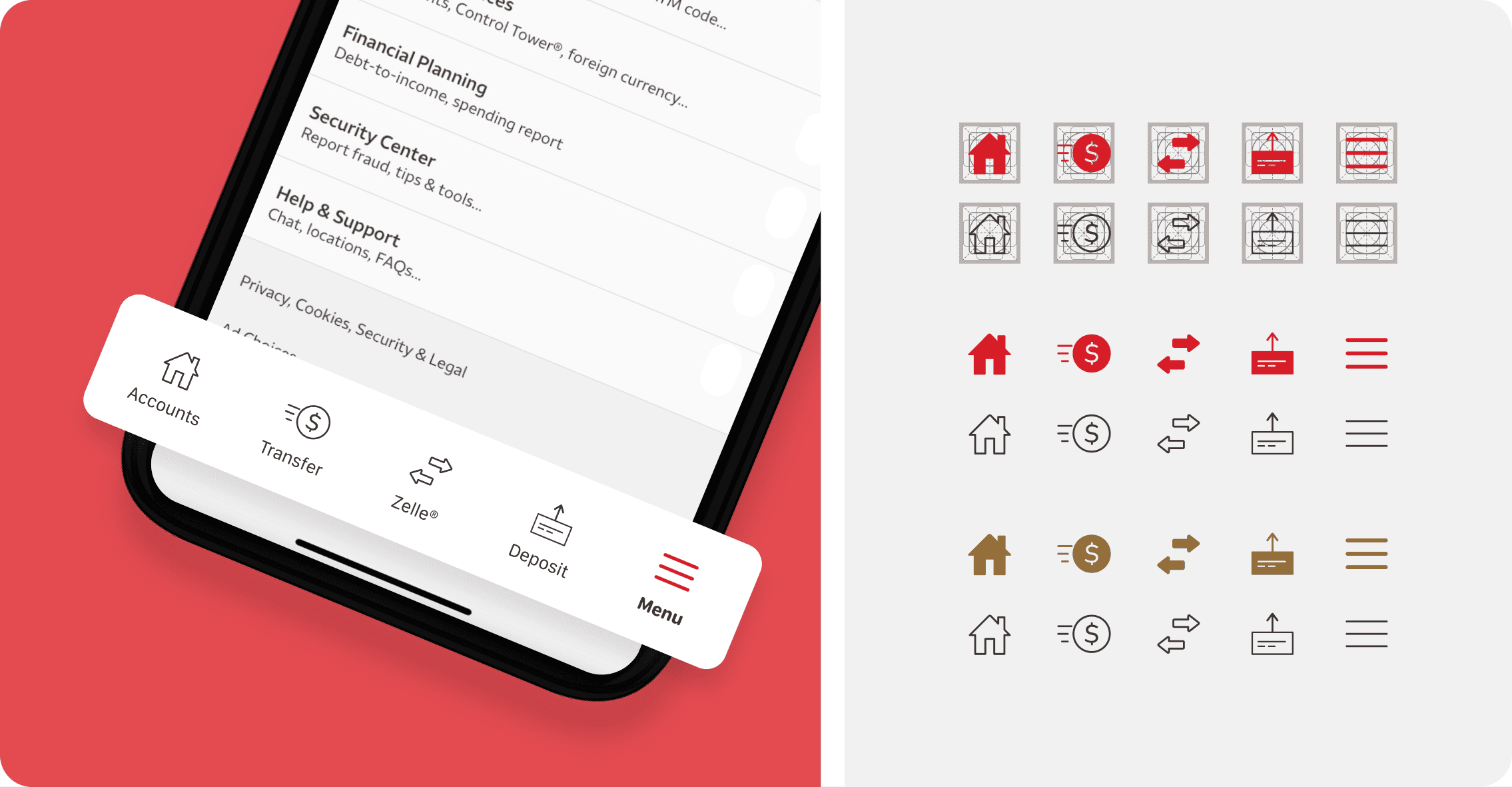
Clear category names improved findability, allowing users to quickly locate what they needed. We simplified the navigation frame by removing the Wells Fargo logo and red color.
After the bottom navigation was approved, I created proof of concept (POC) icon assets and specifications for the engineering team to build the final navigation bar.
Results
Navigation success rate increased from 35% to 95%
Support calls related to navigation dropped by ~30%
App Store reviews reflected positive user sentiment within 3 months
Future & Experience Vision
After we shipped the new mobile navigation, leadership chartered a re-imagining of the app. As part of a cross-functional design studio, I helped generate and refine concepts that move the experience toward personalized, contextual banking.
Using personas and day-in-the-life scenarios, we mapped moments when customers want to invest, optimize, or save, then designed insight cards, contextual entry points, and a refreshed visual language to support them. Explorations included mortgage/home-price tools, cash-flow buffers, and bill-autopay nudges.
Note: The visuals here are concept work created during the studio; they illustrate direction, not final shipped UI.
🚀 Coming soon! Gen Z Banking
I also contributed a forward-looking concept for Gen Z / Gen Alpha: an AI-guided micro-learning flow that turns financial literacy into small, actionable habits.
Latest projects
Content
Content
Wells Fargo - App Modernization
Wells Fargo, founded in 1852, is one of the largest U.S. banks, offering banking, insurance, investment, and mortgage services to 70M+ customers across 35+ countries. In 2019, the bank aimed to modernize it's mobile app experience. I was part of the navigation and account management team, working on the path towards the progressive modernization of the user experience today.
Company
Wells Fargo
Timeline
2019
—
2020
Role
Senior product designer
Project overview
“There are two sliding navigation menus and they are painfully
slow. Beyond the speed concerns, there are far too many options
listed which just makes the app confusing to use...
Overall the experience really makes me lose confidence
in the company to handle my money properly.”
Challenges
Key tasks (checking credit score, overdraft settings, etc.) were buried under generic labels like “More” and “Services”
Users struggled with navigation, increasing frustration and support call volume
The legacy IA didn’t reflect current user behavior or device habits
Accessibility and consistency issues were piling up
By analyzing quantitative data, the top tasks were clear: Users wanted to view account summary and details but then struggled to perform tasks following up viewing their accounts such as making payments or depositing checks.
I also performed a thorough competitive analysis, to not only validate that the use of a bottom navigation bar, but also to map out how the more menu structure was organized. What needed to be front and center, versus the information architecture of the less frequently used but equally important tasks in case of emergencies such as a lost credit card, or overdraft fees.
Testing the information architecture
As I learned more and collaborated with our UX Researcher, I wondered... “ How can we better organize the information for our customers, but at the same time navigate dependencies and constraints that come in a highly regulated environment like Wells Fargo?”
My team and I worked on a closed card sorting test with a new information architecture with five main groups and concepts in which, users placed words under a category.
Accounts → Open/close account, account summary account details
Move Money → Pay /Transfer/Deposit
Planning & Investment → Retirement & Financial Planning, Brokerage
Settings → Change privacy preferences, change password, my profile
Help → Call us, Baking Assistant, Replace card
Carly: Our consumer banking persona
I looked at our persona Carly and put myself in her shoes, walking through her journey to better understand the sequence of events from her perspective.
What happens after she views her account balances?
Design iterations
Then, I worked on several iterations of the navigation structure. We could take a nested doll approach or a hub and spoke navigational model.
In my process, I wanted to first understand users’ behavior. With my team, we analyzed the paths users were navigating to. In the business side, JD Power reports showed Wells Fargo lagging against competitors. After the competitive audit and research data, I used these learnings to support my design explorations and rationales.
I drafted user flows based on the data received. I enjoy visualizing my thinking and collaborated with my team as we experimented different solutions. I also thought beyond the navigation itself and explored contextual navigation.
Integrating tree test and usability test feedback
I worked with an information architect to design the menu, organizing links by urgency and frequency based on call logs and tree test results. Our structure achieved a 95% success rate in tree testing and moderated usability testing.
Solution: Bottom nav and structured more menu
Clear category names improved findability, allowing users to quickly locate what they needed. We simplified the navigation frame by removing the Wells Fargo logo and red color.
After the bottom navigation was approved, I created proof of concept (POC) icon assets and specifications for the engineering team to build the final navigation bar.
Results
Navigation success rate increased from 35% to 95%
Support calls related to navigation dropped by ~30%
App Store reviews reflected positive user sentiment within 3 months
Future & Experience Vision
After we shipped the new mobile navigation, leadership chartered a re-imagining of the app. As part of a cross-functional design studio, I helped generate and refine concepts that move the experience toward personalized, contextual banking.
Using personas and day-in-the-life scenarios, we mapped moments when customers want to invest, optimize, or save, then designed insight cards, contextual entry points, and a refreshed visual language to support them. Explorations included mortgage/home-price tools, cash-flow buffers, and bill-autopay nudges.
Note: The visuals here are concept work created during the studio; they illustrate direction, not final shipped UI.